Shipping Matrix Price Updates
Updating the rates table
-
Open
Shipping Update.xlsxin Excel. -
Edit the values on the sheet you need to change.
-
Save the file and close Excel.
-
Run the generator (below).
Running the generator
- Open the generator folder. You should see 3 folders and 2 files:
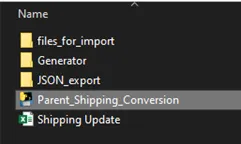
- Double-click
Parent_Shipping_Conversion.exe. - It creates or replaces the files in the output folders. Import files land in
files_for_import.
Next: import into Maropost (Uploading to Neto) and update GMC (Uploading to GMC). Neither process is written down yet.
Generator sheets explained
The Rates, 2nd Parcel and Delivery Times sheets are called the Matrix tables.
Rates
Sets the rates for each shipping category. Columns are zone codes; rows are shipping categories, each linked to a Constructor sheet of the same name.
These rates are what shoppers are quoted. Once a shopper enters a postcode, the product page shows the cheapest delivery option for one unit, for example “Shipping from $12 to 2000” or “Free shipping to 2000”.
2nd Parcel
Sets the 2nd parcel charge for each shipping category. It’s either a fixed price or a percentage, depending on how that shipping category is set up in Maropost.
Delivery Times
Sets the maximum delivery time for each shipping category. GMC takes delivery time as a range, but Maropost holds a single value, so the generator uses a nominal default for GMC’s minimum.
The Maropost value is customer-facing. After a shopper enters a postcode, the product page shows the delivery times of the available options as a range, for example “2–4 days to 2000”. That line only shows for products that ship from our own stock (not live yet, AUD-17). See What shoppers see.
Zones
Holds the zone codes and the carrier for each shipping category, and lets the Constructor sheets look up the zone codes.
Constructor sheets
The Constructor sheets build the import files. Each one is named after its shipping category and lays out the columns the Maropost import expects. They’re needed, but you don’t edit them for a price update.
Keep them hidden; only the generator uses them. See the generator docs for how they’re built.