Content Panel
The Content Panel is the image-and-title link on the right of each level 1 tab in the Shop and Services mega-menus. It promotes one content page related to the tab the customer has open.
The secondary purpose of the Content Panel is to provide SEO benefits.
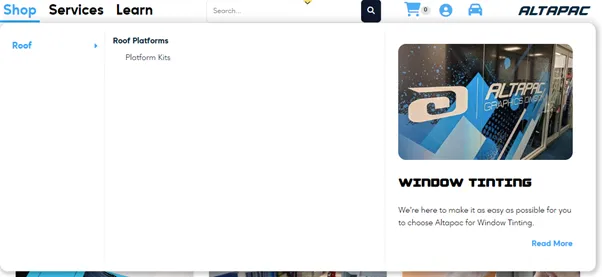
The panel shows three things from one content page: its Alt image 1 (alt_1), its name as the heading, and a link to it.
Connect has no content panel on desktop. On mobile, a Connect level 1 page with child pages does show one from its related content.
For the steps to set or change a panel, see Edit the menus. For the fallback zones alongside the other site-wide zones, see Adverts and content zones.
Content source
Each panel comes from one of two places, in this order:
- The level 1 item’s own Related Content.
- If it has none, a fallback page set in a content zone (desktop only).
Related Content on the level 1 item
Each level 1 item can and should have its own related content selected. This gives each tab a targeted panel instead of the generic fallback.
Set it in the Related Content section of the level 1 category (Shop) or level 1 service page (Services).

- Only one item shows. If you add several related pages, the panel uses just one, and the theme does not set which. Keep one related item if you want to control what the panel shows.
- On a Shop category, the same list also feeds the related cards on the category page (up to 4). Adding cards for the category page can change which page the menu panel shows. See Edit the menus for how the two interact.
Image sizes
The panel uses the promoted page’s Alt image 1. Upload it at 450 × 450 (square). It is the page’s one square image for the whole site: the same upload also shows in the menu tiles and on cards. The theme crops it to fit each place:
| Where | How Alt image 1 is shown |
|---|---|
| Desktop panel | Cropped to 3:2 (the theme sizes it as 450 × 300), full width of the panel |
| Mobile panel | A strip 120 px high across the full width, with the title printed over it |
Both crops keep the middle and cut the top and bottom: the desktop panel loses about a sixth of a square at each end, and the mobile strip keeps only a band across the middle. Pick an image whose subject fills the centre of the frame and still reads at thumbnail size, with no text in it. Most live Alt image 1 uploads are already 450 × 450 (20 of the 36 shown in the menus on 21 October 2026).
For comparison, other menu images use different crops: the level 2 service images and the Connect brand tiles are cropped to 3:1. Those are covered in Edit the menus.
Fallback
If a level 1 item has no related content, the desktop panel falls back to a single page chosen in a content zone. Treat this as a failsafe only, not a way to fill panels.
| Menu | Content zone | Currently points to |
|---|---|---|
| Shop | shop_menu_content | The Accessory Fitment & Solutions service page (content ID 117, /services/accessory-fitment-solutions/) |
| Services | serve_menu_content | The Contact Altapac page (content ID 223, /contact-altapac/) |
There is no fallback zone for Connect.
Mobile has no fallback. A level 1 item without related content shows no panel on mobile.
For developers
Theme files this page is based on
From Altapac-ReDev, branch development:
src/templates/headers/includes/components/desk-Menu.template.html: inside[%cache type:'cmenu' id:'web_deskmenu-v2' ttl:'86400' %]. Panel is[%list type:'content' filter:'related_content=[@content_id@]' limit:'1'%]with nosortby(Shop lines 50-80, Services 161-191). The*ifemptyfallback sets[@shop_menu_content_id@]/[@serve_menu_content_id@]from[%content_zone%]and passes it straight to[%show_content id:%]. Link bug:[@url@]inside thatshow_content*bodyresolves to the level 1 item’s URL (lines 67 and 178), while[@content_name@]and[@content_id@]resolve to the zone page.src/templates/headers/includes/components/mobile-Menu.template.html: cacheweb_burgermenu-v2, 24 hours. Same relatedlist ... limit:'1'for Shop, Services and Connect, with no*ifempty, and printed only when the level 1 item has a next level.src/css/custom.css:.megamenu .megamenu-content img(aspect-ratio: 3/2,object-fit: cover),.burger-menu .megamenu-content img(height: 120px),img.lvl2-image(aspect-ratio: 3 / 1).